
Gawr Gura Quest for Bread How to play Quest for Bread
Jump, spin, and fight without walking Gura into magma.
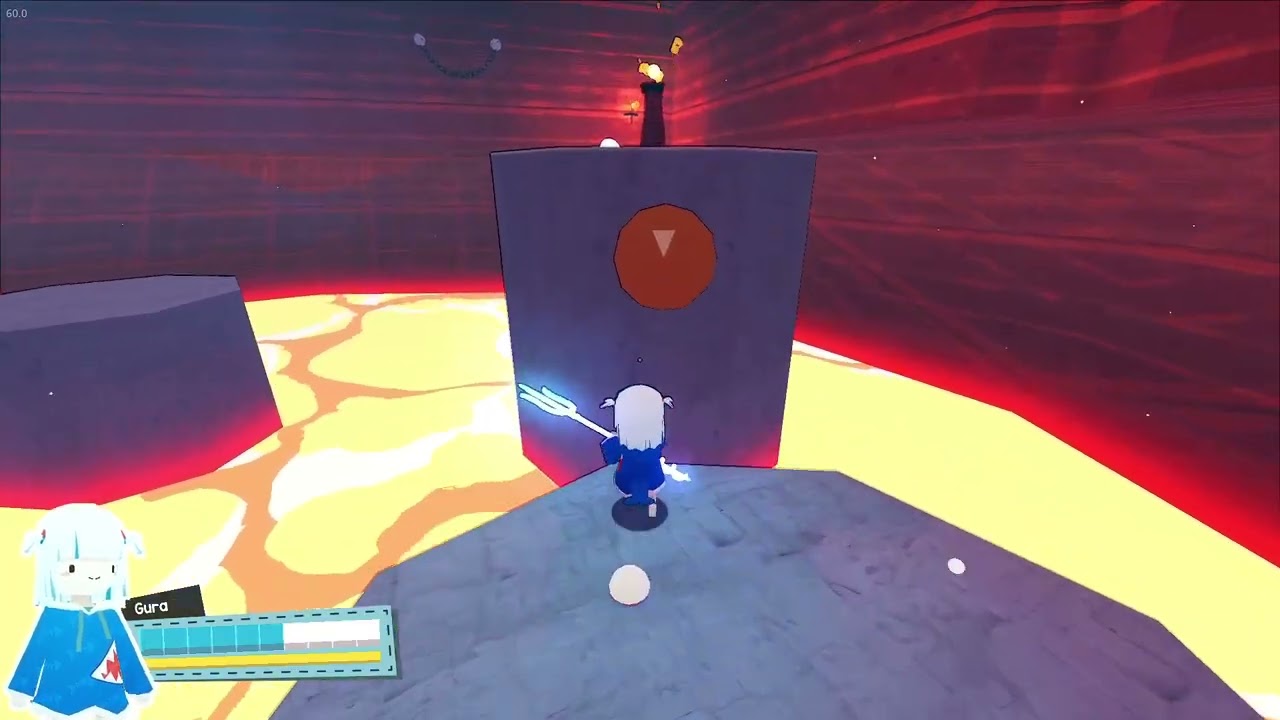
Gawr Gura: Quest for Bread is a third-person action-platformer. Steam’s own pitch is the control scheme: jump, spin, and fight. Circulating footage matches that pitch. Gura stands on a narrow grey rock above a lava sea with a cyan-glowing trident, a torch on a taller block, and two resource bars under her portrait. If you treat that screenshot as a tutorial slide, most deaths in the first hour start to look preventable.
This page is the mechanical sister of Getting Started. Bind tables live on Controls. Settings and install live on Getting Started and the PC & Deck sheet. Spacing, camera, and why the yellow bar matters live here. Pair it with the walkthrough when you need a route, and the boss guide when an arena stops being a hallway.
The loop
Movement is the game. Combat is a short, readable melee that exists so platforming rooms can throw enemies at you without becoming a character-action title. You are not building a skill tree. You are learning how long Gura hangs in a spin, how far a trident poke reaches, and when a ledge is a ledge versus a death plane.
Footage of the lava fortress is the best teacher. Orange floors are not decoration. The rock you are standing on is the entire safe language of the room. Optional white spheres sit just off the obvious path — the same grammar hats will use later. If a jump looks greedy, it is greedy. The hat guide will ask you to take greedier lines after you can do the conservative ones in your sleep.
HUD
The HUD in captured gameplay is honest. Bottom-left: Gura’s chibi portrait, her name, a long cyan bar, a shorter yellow bar. Top-left sometimes shows a frame-rate debug. During the Calliope fight a named red bar labelled Mori Calliope sits at the top of the arena. Learn those two screens. Cyan dropping on hits is the life conversation. Yellow moving when you commit to spin or burst movement is the stamina-style conversation. We will not invent exact stat names the game does not print; we will tell you to watch which bar twitches when you get slapped versus when you spam aerials.
If either bar is empty, stop taking optional jumps. The game saves anytime, so a panicked hat grab is never worth a five-minute backtrack. That is also why the hat tracker exists: mark the hat, leave, come back healthy.
Jump, spin, trident
Steam lists tight acrobatic platforming. Older coverage of the project mentioned backflips; shipped footage shows a compact shark who commits to air time and comes down with a weapon. Practice on a wide floor before a magma room:
- Walk to a painted edge and stop. Confirm the camera is behind Gura, not inside a wall.
- Jump in place. Note apex. That apex is your tax for every lava gap.
- Add the spin. Note extra hang or displacement. If the spin eats the yellow bar, you now know the cost of style.
- Swing the trident on landing, then in the air. Measure reach against a dummy enemy or a torch block. Do not swing while the camera is mid-reorient.
Full controller support is on the store, including Xbox pads, and the game is playable without quick-time events. On a pad, keep camera on the right stick and never use attack as a movement cancel unless you have proven it in a safe room. On keyboard, a sloppy mouse flick during a spin is how people walk off the Calliope skulls.
Camera and deaths
Third-person platformers kill you with the camera more than with the boss. Hold the stick so Gura’s next landing is on-screen before you jump. In the lava fortress, look down at magma only long enough to confirm it is still magma, then snap back to the next rock. In the Calliope arena, skull platforms sit in a crowd of glowing hazards; if the camera buries the named health bar, you will miss a telegraph.
Death should teach a verb. Hit lava because you jumped early: jump later. Hit lava because you spun off-axis: shorter stick. Hit a boss because you attacked during a laser: wait. If you cannot name the verb, you are not practicing, you are repeating. The speedrun guide is the same verbs at a higher tax.
Input device
Steam Deck Verified plus Xbox controller support is the intended living-room setup. Keyboard is fine for people who already aim cameras with a mouse. Whatever you pick, finish Getting Started dead-zone checks before a boss. A drifting left stick in magma is indistinguishable from a skill issue.
When movement feels fair, go back to the Guides Hub or jump into the walkthrough. The video in the middle of this page is real PC gameplay, useful as a timing reference, not as a frame-perfect chart.
Frequently Asked Questions
Quick answers for first-time shark pilots and 100% hunters.
Keyboard or controller?
Both work. Steam lists full controller support and Steam Deck Verified. Pick the device you can aim a camera with, then read Getting Started for dead zones.
What do the HUD bars mean?
Footage shows a cyan bar and a yellow bar under Gura. Watch which one drops on hits versus on committed spins; do not invent stat names the game does not print.
When do I start hat hunting?
After you can cross lava without thinking. Then use the hat guide.