
Gawr Gura Quest for Bread Getting started in Quest for Bread
Steam install, Deck settings, HUD bars, and a first-hour route that does not chase every hat.
Gawr Gura: Quest for Bread is a bite-sized 3D action-platformer: you jump, spin, and fight so a shark can reunite with lost bread. Buy it on Steam as app 2054520. Kenny Park built it; holo Indie published it on 27 August 2026. The store page lists roughly two hours of campaign, silly hats, unique bosses, and a dedicated speedrun mode. Launch week ran a 10% introductory discount through 3 September 2026.
This page is the on-ramp. It does not replace the walkthrough or the hat tracker. It gets the game installed, the camera sane, and your first death productive instead of confusing.
Install and hardware
Minimum specs on Steam are modest: Windows 10/11 in practice (the page still mentions older Windows, but the Steam client itself does not), an Intel i3-370M class CPU, 4 GB RAM, and a GeForce MX 150. The sound-card line is a joke (“what is a sound card”). There is no beefy recommended spec because the game is a stylised third-person platformer, not a ray-traced sim. The full hardware write-up is the PC & Deck sheet. Bind tables live on Controls. Cameos and named fights live on Characters.
Steam Deck is Verified. Full controller support is listed, including Xbox pads. Accessibility notes include save-anytime and no quick-time events. If you are on Deck, start in the default verified profile, then only tweak if the camera inversion feels wrong. Keyboard and mouse work; many 3D platformers feel better on a pad because camera and jump live on different hands. Try both for ten minutes using How to Play as the drill sheet.
Steam Cloud is on, so a Deck session and a desktop session can share a file if you let the client sync before you switch machines. Family Sharing is listed on the store page.
First launch checklist
- Confirm the language. The game’s interface is English only even though this wiki is not. You will not find a French menu in-game.
- Set brightness so lava reads as lava and dark concert floors still show skull platforms.
- Bind or confirm jump, attack, and camera on Controls. Do not start a file until you can spin without accidentally swinging the trident into a pit.
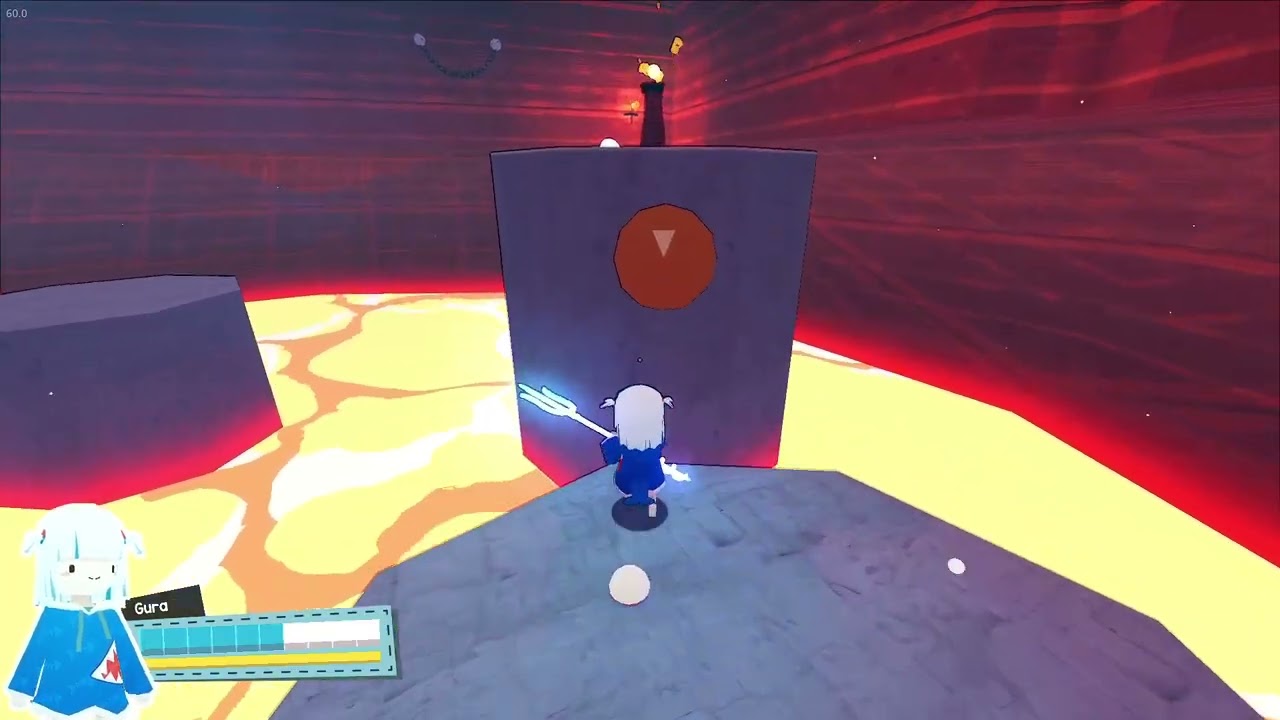
- Play the opening until you see Gura’s portrait HUD: cyan and yellow bars under her name. Those are your life and stamina-style resources in circulating footage. Learn which one drops when you get hit versus when you spam movement.
- Die on purpose once on a cheap hazard so you learn the respawn, not in a boss arena.
A captured lava-fortress shot shows Gura on a grey rock above orange magma, trident glowing, a torch on a taller block, and a white collectible sphere near her feet. That composition is the game’s thesis: tight platform, obvious death plane, something optional off to the side. Pick up the optional thing only if the jump is already comfortable.
What the first hour should be
The plot is a Hololive in-joke that still works as a platformer setup. Gura loses a baguette. Amelia Watson, time detective, tries to rewind the mistake. Time travel goes wrong and Gura is left in unfamiliar territory. You will meet Myth faces: Ina appears in a dialogue scene on a torii platform, Calliope gets a named boss bar in a skull-lit arena, and Amelia is in the premise. Enjoy the lines, then move. The game is linear enough that “getting lost” is usually missing a hat, not missing the exit. The achievement name Get Lost on the Steam page is a wink, not a promise of a 40-hour Metroidvania.
Do a story-forward run. Skip hats that sit behind a jump you cannot yet see the landing for. Boss doors are the chapter gates; treat them like exams, not like collectible rooms. After you beat the game once, the hat guide and boss guide become useful instead of noisy.
Settings that actually matter
- Camera: invert Y if your thumbs expect a flight stick. Third-person platformers punish a camera that fights you more than they punish low graphics.
- Dead zones: if a pad drifts, Gura walks into lava without you.
- Performance: lock a stable frame rate on Deck. A stutter during a spin is a death.
- Audio: the jokes land better with voices and music up; combat still needs the jump landing to be audible.
After the first clear
Open speedrun mode only after you know the lava fortress by heart. Use the achievement tracker for the 11 Steam badges — read names from the overlay rather than a guessed list. Read the review if a friend is asking whether two hours is “enough game.” Then come back to this page only when a patch changes defaults; until then, the Guides Hub is a better index.
The video below is a real first-look capture of the demo, useful for seeing jump height and the lava read before you install.
Frequently Asked Questions
Quick answers for first-time shark pilots and 100% hunters.
Is Quest for Bread free?
No. It is a paid Steam game. A launch discount ran through 3 September 2026. Check the launch notes for store context.
Can I play on Steam Deck?
Yes. Valve lists it as Steam Deck Verified with full controller support. See the Deck notes above and How to Play.
Should I 100% hats on the first run?
No. Finish the story, then sweep with the hat tracker.
Does the game have multiplayer?
It is a single-player campaign. Bring a friend to watch, not a second pad.